Please don't fall for any job/grants/SaaS/Software related scams. For any query or concerns please reach to us directly at +65 6834 3026 or WhatsApp at +65-8910 8216
Please don't fall for any job/grants/SaaS/Software related scams. For any query or concerns please reach to us directly at +65 6834 3026 or WhatsApp at +65-8910 8216
Managing IT hardware across different teams and locations can be challenging without a proper system in place. IT hardware asset management offers a structured way to plan, track, and maintain devices throughout their lifecycle.
This process helps organisations get the most value from their equipment by improving control, supporting compliance, and ensuring assets are always available when needed. Using hardware asset management software, businesses can easily monitor devices, reduce manual tasks, and keep asset information up to date.
In this guide, you’ll learn how to track devices effectively across teams, discover the benefits of hardware asset management, and follow the best practices for staying organised and efficient as your organisation grows.
See how Genic Assets locates equipment in seconds and keeps maintenance on schedule — book a free demo.
IT Hardware Asset Management is the systematic process of efficiently handling IT equipment throughout its entire lifecycle to get the maximum value for the business.
It provides a structured approach to planning, tracking, maintaining, or retiring IT assets strategically and proactively.
A comprehensive hardware asset management strategy supports efficient use and cost-effectiveness by integrating physical assets with IT services.
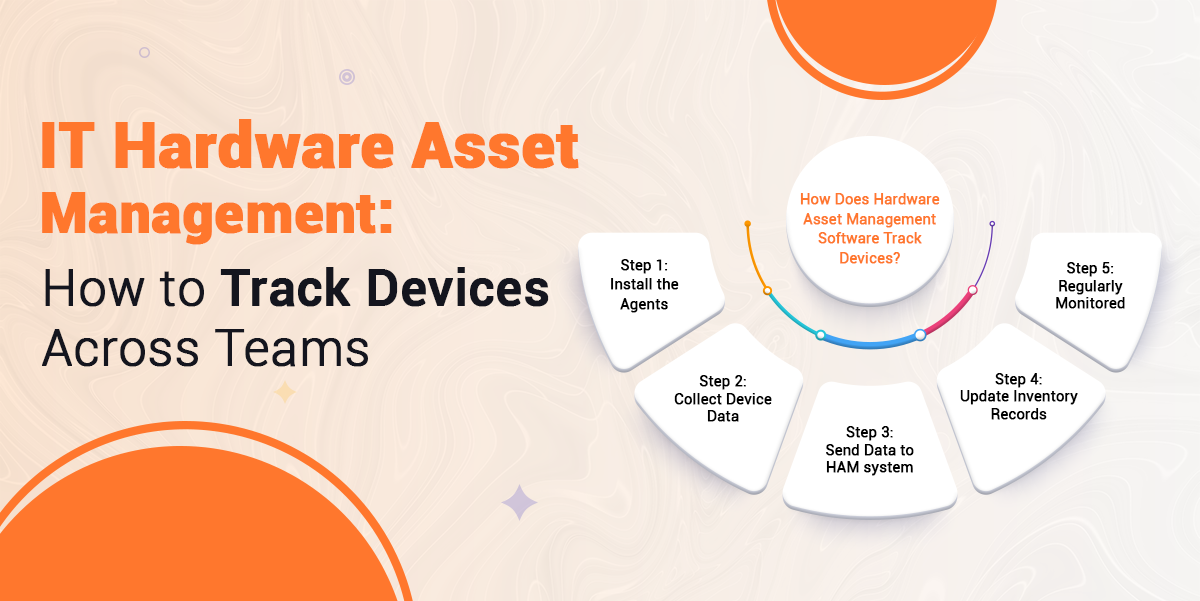
A small software agent is installed on each device that needs to be tracked, such as laptops, desktops, or servers.
After installing the agent will automatically collect information from devices. It includes hardware specs, software installed, operating system details, and the device’s current health status.
So, after collecting information, the agents securely send this data to the centralised hardware asset management software through the internet or company network.
At this stage, the HAM software receives and stores the data, ensuring that the device information in the asset database is always accurate and up to date.
Now, at the last step, the agent continues to run quietly in the background and sends regular updates. This enables real-time tracking of any changes, including hardware upgrades, new software releases, and security updates. This supports businesses that need to understand how to track IT assets across multiple locations.
By following IT hardware asset management best practices, organizations can offer several advantages, which are discussed below:
A hardware asset management system lowers maintenance costs and reduces the risk of unexpected hardware failure. By tracking the asset lifecycle, HAM alerts you before the devices die. This helps to prevent wasted spending on outdated or unused equipment and ensures assets are serviced on time, extending their life while keeping the cost under budget.
HAM reduces manual work by automating asset-related routine tasks. This allows employees to focus on higher-value work instead of administrative processes. The asset issues are identified early by reducing downtime and preventing disruptions.
With a Hardware asset management system, you have greater visibility into hardware assets, which improves inventory control. Asset discovery tools help to ensure devices are used correctly at the right time.
HAM helps to prevent asset loss by tracking usage and ownership. By monitoring how and where devices are used, businesses can identify irregularities early. So, lost and stolen assets can be identified faster, which reduces replacement cost and downtime.
Below are the best asset management practices that you should follow to achieve higher productivity:
Plan how you will manage your hardware. Decide what you and your organization want to achieve, such as keeping a better track of devices. Defining a clear strategy is the first step of IT hardware asset management best practices.
List out which items you want to track, including small and big hardware. Decide if small items like keyboards and mice should be grouped.
So using an auto-discovery helps you see which devices are on your network. It quickly shows missing, extra, and unused devices so you can act fast and plan your purchases better.
Give every asset a unique number or name along with a barcode label. This makes it easy to find, track, and audit devices in the future.
Start by deciding why you are doing the audit. Set clear goals, whether it’s for financial reasons, security, or saving costs. Choose which assets you will include, such as all devices or just key items like servers, laptops, and mobiles.
Build your main inventory by gathering data from all available sources. Use automated discovery tools to find devices and software on your network. Add extra details from purchase records to cover items not directly found by the system.
Check that the devices in your digital inventory exist in the real world. Use barcode or QR scanners to verify asset tags and serial numbers. Make sure each asset has a unique tag so you can track it in future audits.
Look over the collected data for any issues. Find hardware that’s outdated, unused, or no longer needed. Check that your software use matches what you have paid for and look for any risks, such as unapproved devices or assets left with ex-employees.
Share your findings with management. Highlight any problems and support them with photos or logs if needed. Assign clear actions, like reassigning licences or wiping old devices, and set deadlines for each fix.
If you are thinking about how to audit IT assets efficiently in modern business, then this step-by-step process will keep your organisation compliant and ready for any challenge.
A reliable hardware asset management software gives organisations better control over their IT devices, reduces risks, and supports smarter decision-making. By combining automated tools with clear processes, businesses can lower costs, prevent asset loss, and keep their inventory accurate.
So, hardware asset management software makes it easier to track devices in real time, while regular audits and best practices ensure nothing is overlooked. With the right approach, organisations can improve productivity, stay compliant, and make the most of every IT asset across all teams.
If you are looking for an effective asset management solution for better management, try Genic Assets Management Software Solutions!
Articles you might like






Genic Assets provide complete visibility, traceability, and accountability of your assets!
Get StartedAre you ready to switch from Excel and Spreadsheets to Cloud-based Asset Management Software? Get started with Genic Assets Management System!